
This is the next generation Razer device configuration tool bringing the Razer gaming experience to the free OpenSource world.
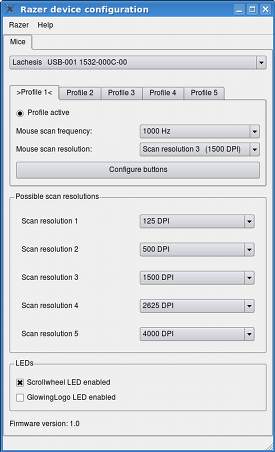
The tool architecture is based on "razerd", which is a background daemon doing all of the lowlevel privileged hardware accesses. The user interface tools are "razercfg", a commandline tool; and "qrazercfg", a Qt based graphical device configuration tool (see screenshot below).
| Device name | Support status | USB ID |
|---|---|---|
| Razer Boomslang CE mouse | Stable, but missing minor features. | 1532:0005 |
| Razer Copperhead mouse | Stable, but missing minor features. | 1532:0101 |
| Razer DeathAdder Classic mouse | Stable | 1532:0007 |
| Razer DeathAdder 3500 DPI mouse | Stable | 1532:0016 |
| Razer DeathAdder Black Edition mouse | Stable | 1532:0029 |
| Razer DeathAdder 2013 mouse | Stable | 1532:0037 |
| Razer DeathAdder Korea PCBang edition mouse | Stable | 1532:0038 |
| Razer DeathAdder Chroma mouse | Stable | 1532:0043 |
| Razer Diamondback Chroma mouse | Stable | 1532:004C |
| Razer Imperator Classic and 2012 mice | Driver exists, but is currently broken | 1532:0017 |
| Razer Krait mouse | Stable | 1532:0003 |
| Razer Lachesis Classic mouse | Stable, but missing minor features. | 1532:000C |
| Razer Lachesis 5600 DPI mouse | Driver exists, but is currently broken | 1532:001E |
| Razer Mamba (tournament edition) mouse | Stable | 1532:0046 |
| Razer Naga Classic mouse | Stable | 1532:0015 |
| Razer Naga Epic mouse | Stable | 1532:001F |
| Razer Naga 2012 mouse | Stable | 1532:002E |
| Razer Naga 2014 mouse | Stable | 1532:0040 |
| Razer Naga Hex (v1) mouse | Stable | 1532:0036 |
| Razer Naga Hex 2014 mouse | Stable | 1532:0041 |
| Razer Taipan mouse | Stable | 1532:0034 |
| Any other wired, wireless or hybrid wired/wireless Razer mouse not listed here | Currently unsupported |
Razercfg does only offer options for features supported by the actual hardware of the mouse. So if the hardware does not support button remapping for example, razercfg will not offer button options, even if the windows driver does. Button remapping on these devices has to be done by xmodmap, xinput or other X11 tools. One exception is profiles, though. If the mouse does not support profiles in hardware, razercfg will emulate 20 profiles in software.
| Device name | Supported features |
|---|---|
| Razer Boomslang CE mouse | hP, B*, F, D, L |
| Razer Copperhead mouse | hP, B*, F, D, L |
| Razer DeathAdder Classic mouse | eP, F, D, L |
| Razer DeathAdder 3500 DPI mouse | eP, F, D, L |
| Razer DeathAdder Black Edition mouse | eP, F, D |
| Razer DeathAdder 2013 mouse | eP, F, D, L |
| Razer DeathAdder Korea PCBang edition mouse | eP, F, D, L |
| Razer DeathAdder Chroma mouse | eP, F, D, L |
| Razer Diamondback Chroma mouse | eP, F, D, L |
| Razer Imperator Classic and 2012 mice | hP, B*, F, D, L |
| Razer Krait mouse | eP, D |
| Razer Lachesis Classic mouse | hP, B*, F, D, L |
| Razer Lachesis 5600 DPI mouse | hP, B*, F, D, L |
| Razer Mamba (tournament edition) mouse | eP, F, D, L |
| Razer Naga Classic mouse (wired) | eP, F, D, L |
| Razer Naga Epic mouse | eP, F, D, L |
| Razer Naga 2012 mouse | eP, F, D, L |
| Razer Naga 2014 mouse | eP, F, D, L |
| Razer Naga Hex (v1) mouse | eP, F, D, L |
| Razer Naga Hex 2014 mouse | eP, F, D, L |
| Razer Taipan mouse | eP, F, D, L |
| eP | = Emulated profiles |
| hP | = Hardware profiles |
| F | = Frequency switching |
| B | = Button remapping |
| D | = DPI switching |
| L | = LEDs switching |
| * | = Not fully supported |
- Q: My buttons don't show up in qrazercfg. What is wrong?
A: Most likely there is nothing wrong with that. If the menu does not show, your mouse does not have support for internal hardware button remapping. See the supported hardware features table above. - Q: But the Windows driver has a button remapping feature.
So razercfg should have that, too.
A: Razercfg is only supposed to configure the hardware. If you want any software remapping of buttons, which is what the Windows driver does, you need other tools. Your search engine will help you.
The following prerequisites are required to start working on
a driver for a new device.
You need
- to be able to understand and write C code.
- to read the contribution guidelines.
- the original Razer Windows driver for the device.
- some way to sniff the USB-traffic of the configuration sequences with the original Windows driver.
If you lack one of these prerequisites, please try to get all of them before contacting me.
Modern mice most likely implement the "Synapse 2.0" wire protocol or (even more likely) a derivative thereof. That protocol is implemented in librazer/synapse.c. Drivers for mice with synapse protocol are supposed to use that generic code and tell it with feature-flags (enum razer_synapse_features) about slight variations in the wire protocol. See the hw_imperator.c and hw_lachesis5k6.c drivers for examples. New mice most likely require adding more feature flags and modifications to the generic synapse code.
Older devices or device families like the Deathadder for example use their own protocol that differs a lot from Synapse. See the implementations of the individual devices for more information.
Synapse 2.0 Framework is the name of the new Windows driver for Razer
devices.
It basically is a one-supports-all solution. One driver for many devices.
That's great.
However, what's not to great is the required internet connection, online
registration and cloud connection. You guys at Razer, are you serious?
A device driver with forced registration and cloud connection? This
is ridiculous.
I am not going to play this game. I won't buy any new Razer product that
requires an online registration or any sort of internet connection to run
the device driver. That also means that I will not work on razercfg support
for these devices.
-
razercfg release 0.44
.tar.xz archive
PGP signature - Older razercfg releases can be found here.
The development source code of razercfg can be downloaded using
the Git version control system as follows:
git clone https://git.bues.ch/git/razer.git
To browse the Git repository online, go to the
repository web interface.
Or download the compressed snapshot.
A mirror of the repository is available on
GitHub,
GitLab,
Bitbucket and on
NotABug.org.
If you want to contribute to razercfg, please read
the contribution guidelines first.
For information on how to install razercfg see the README.md file that is shipped with razercfg.
Razercfg is stable/production quality software.
That means its features are well tested and the remaining amount of bugs probably is minor.
The documentation is not complete.
If you find any bugs in razercfg or if you have any suggestion for new
features, we would like to hear from you.
Your help is greatly appreciated and will help to create better
software and improve the overall experience for everybody.
So don't hesitate to report anything that that limits your razercfg usage.
If you have got any code improvements or other improvements that should be merged into the project, please send such enhancements to the razercfg maintainer.
Please read the contribution guidelines first.
Copyright (C)
Michael Büsch et al.
Licensed under the terms of the
GNU General Public License version 2
or (at your option) any later version.
See the sourcecode for details.